Cisco Training Courses

Kurssit

Insoft on palvellut IT-yhteisöä Ciscon virallisella koulutustarjonnalla vuodesta 2010. Tältä sivulta löydät kaikki olennaiset tiedot Ciscon koulutuksesta.

Katso lisää Cisco Training Learning Partner
Cisco Learning Credits

Cisco Learning Credits

Cisco opintopisteet (CLC) ovat suoraan Ciscon kanssa lunastettuja prepaid-koulutusseteleitä, jotka helpottavat menestyksen suunnittelua ostaessasi Ciscon tuotteita ja palveluita.

Katso lisää Cisco Training Learning Partner
Cisco Continuing Education

Cisco Continuing Education

Cisco täydennyskoulutusohjelma tarjoaa kaikille aktiivisille sertifioinnin haltijoille joustavia vaihtoehtoja uudelleensertifiointiin suorittamalla erilaisia kelvollisia koulutuskohteita.

Katso lisää Cisco Training Learning Partner
Cisco U Digital Learning

Cisco Digital Learning

Sertifioidut työntekijät ovat ARVOSTETTUJA omaisuuseriä. Tutustu Ciscon valtuutettuun digitaaliseen oppimiskirjastoon ja kouluta itseäsi tallennettujen istuntojen avulla.

Katso lisää Cisco Training Learning Partner
Cisco Business Enablement

Cisco Business Enablement

Cisco Business Enablement Partner Program keskittyy Cisco Channel Partnersin ja asiakkaiden liiketoimintataitojen terävöittämiseen.

Katso lisää Cisco Training Learning Partner
Fortinet Certification Training

Kurssit

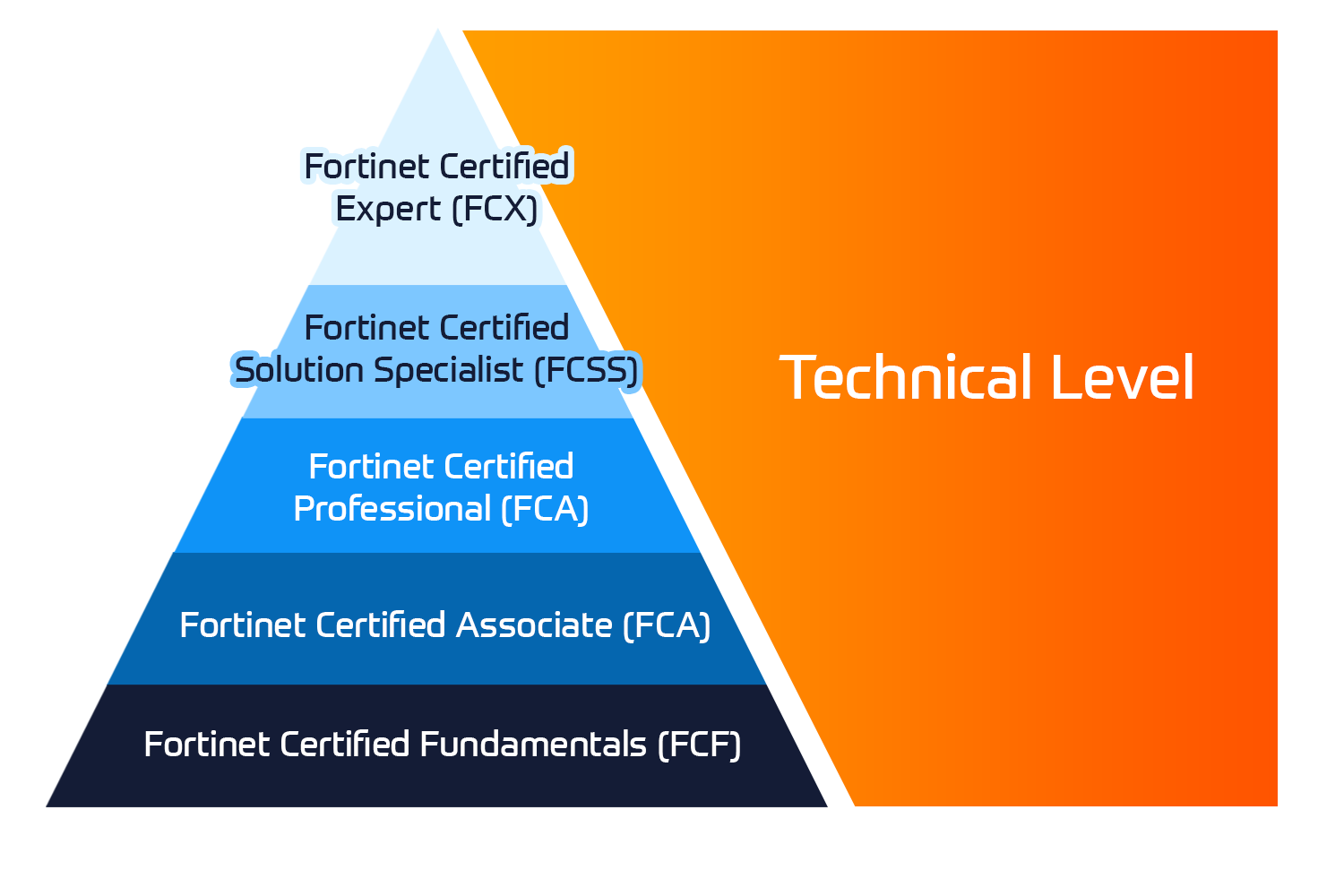
Insoft Services on auktorisoitu Fortinet-kouluttaja useassa Euroopan maassa.

Katso lisää Fortinet Premier Authorized Training Center
Fortinet Training Courses

ATC Status

Tarkista ATC-tilamme valituissa Euroopan maissa.

Katso lisää Fortinet Premier Authorized Training Center
AWS

Kurssit

Koulutus sisältää omatoimisia laboratorioita käytännön AWS-harjoitteluun tosielämän skenaarioissa, jolloin voit oppia omaan tahtiisi, luokassa, töissä tai verkossa.

Katso lisää AWS
Extreme Networks Training Partner

Kurssit

Extreme Networks Technical Trainingin kehitys tarjoaa kattavan progressiivisen polun associate-akkreditoinnista ammatilliseen akkreditointiin.

Katso lisää Extreme Networks Training Partner
Extreme Networks Training Partner

ATP-akkreditointi

Valtuutettuna koulutuskumppanina (ATP) Insoft Services varmistaa, että saat korkeimman saatavilla olevan koulutuksen.

Katso lisää Extreme Networks Training Partner
Insoft Services

Tiimimme

Koulutusvalikoimaamme kuuluu laaja valikoima IT-koulutusta IP-palveluntarjoajilta, mukaan lukien Cisco, Extreme Networks, Fortinet, Microsoft, muutamia mainitakseni, EMEA-alueella.

Katso lisää Insoft Services

Network Security Support Engineer

Ota yhteyttä

Voit olla meihin yhteydessä ja tiedustella koulutuksistamme täydentämällä yhteystietosi ja koulutuksen nimen oheen.

Tietosuojalauseke ja yksityisyys

Suostun vastaanottamaan sähköpostiviestejä ja/tai puheluita Insoft Services Oy: n tuotteista ja palveluista.
Hyväksyn, että tietojani kerätään ja käsitellään Insoft Servicesin tietosuojakäytännössä kuvatulla tavalla.

Close

Network Security Support Engineer

VARAA NYT
Network Security Support Engineer
Kesto
3 päivää (8 tuntia/päivä)
5 päivää (Puolen päivän istunnot)
Toimitus
(Online ja paikan päällä)
Hinta
Hinta pyydettäessä

In this course, you will learn how to diagnose and troubleshoot the most common networking and security problems in a Fortinet protected network security solution. In interactive break-and-fix labs, you will use tools, diagnostics, and debug commands to detect, isolate, and resolve problems related to the most commonly used FortiGate features, such as IPsec, routing, web filtering, high availability (HA), IPS, and more. These skills and this knowledge will give you an advanced understanding of how to support a network security solution based on FortiGate devices.

Product Versions:

  • FortiGate 7.6.2

After completing this course, you will be able to:

  • Set up a baseline for FortiGate and analyze the first steps to diagnose a FortiGate
  • Monitor process activity, diagnose conserve mode, and troubleshoot unexpected reboots and frozen devices
  • Analyze information in the session table and debug flow output
  • Troubleshoot session helpers
  • Troubleshoot common problems related to local, LDAP, RADIUS, and SAML authentication
  • Troubleshoot common FSSO problems
  • Troubleshoot FortiGuard and web filtering problems
  • Monitor an HA cluster and troubleshoot common HA problems
  • Troubleshoot and diagnose IPsec VPNs with debug and sniffer commands
  • Troubleshoot routing problems with debug commands
  • Monitor OSPF status and troubleshoot common OSPF problems with debug commands
  • Monitor and verify the BGP status with commands and troubleshoot common BGP issues
  • Troubleshooting Concepts
  • System Resources
  • Sessions, Traffic Flow, and Networking
  • Security Fabric
  • Firewall Authentication
  • FSSO
  • Security Profiles
  • High Availability
  • IPsec
  • IPsec―IKEv2
  • Routing
  • BGP
  • OSPF
  • Networking and security professionals involved in diagnosing, troubleshooting, and supporting an enterprise security infrastructure using FortiGate devices should attend this course.
  • This course assumes advanced knowledge of networking, and extensive hands-on experience working with FortiGate.
  • You must have an understanding of the topics covered in the FortiGate Administrator course, or have equivalent experience:
  • It is also recommended that you have an understanding of the topics covered in the Enterprise Firewall course.

In this course, you will learn how to diagnose and troubleshoot the most common networking and security problems in a Fortinet protected network security solution. In interactive break-and-fix labs, you will use tools, diagnostics, and debug commands to detect, isolate, and resolve problems related to the most commonly used FortiGate features, such as IPsec, routing, web filtering, high availability (HA), IPS, and more. These skills and this knowledge will give you an advanced understanding of how to support a network security solution based on FortiGate devices.

Product Versions:

  • FortiGate 7.6.2

After completing this course, you will be able to:

  • Set up a baseline for FortiGate and analyze the first steps to diagnose a FortiGate
  • Monitor process activity, diagnose conserve mode, and troubleshoot unexpected reboots and frozen devices
  • Analyze information in the session table and debug flow output
  • Troubleshoot session helpers
  • Troubleshoot common problems related to local, LDAP, RADIUS, and SAML authentication
  • Troubleshoot common FSSO problems
  • Troubleshoot FortiGuard and web filtering problems
  • Monitor an HA cluster and troubleshoot common HA problems
  • Troubleshoot and diagnose IPsec VPNs with debug and sniffer commands
  • Troubleshoot routing problems with debug commands
  • Monitor OSPF status and troubleshoot common OSPF problems with debug commands
  • Monitor and verify the BGP status with commands and troubleshoot common BGP issues
  • Troubleshooting Concepts
  • System Resources
  • Sessions, Traffic Flow, and Networking
  • Security Fabric
  • Firewall Authentication
  • FSSO
  • Security Profiles
  • High Availability
  • IPsec
  • IPsec―IKEv2
  • Routing
  • BGP
  • OSPF
  • Networking and security professionals involved in diagnosing, troubleshooting, and supporting an enterprise security infrastructure using FortiGate devices should attend this course.
  • This course assumes advanced knowledge of networking, and extensive hands-on experience working with FortiGate.
  • You must have an understanding of the topics covered in the FortiGate Administrator course, or have equivalent experience:
  • It is also recommended that you have an understanding of the topics covered in the Enterprise Firewall course.
    Kurssiaikataulu
  • ` Nov 16 - Nov 20, 2026
    Puolen päivän istunnot
  • ` Dec 14 - Dec 16, 2026
  • ` Jan 11 - Jan 13, 2027
  • ` Feb 8 - Feb 10, 2027
  • ` Mar 8 - Mar 10, 2027
  • ` Apr 12 - Apr 14, 2027