Cisco Training Courses

Kurssit

Insoft on palvellut IT-yhteisöä Ciscon virallisella koulutustarjonnalla vuodesta 2010. Tältä sivulta löydät kaikki olennaiset tiedot Ciscon koulutuksesta.

Katso lisää Cisco Training Learning Partner
Cisco Learning Credits

Cisco Learning Credits

Cisco opintopisteet (CLC) ovat suoraan Ciscon kanssa lunastettuja prepaid-koulutusseteleitä, jotka helpottavat menestyksen suunnittelua ostaessasi Ciscon tuotteita ja palveluita.

Katso lisää Cisco Training Learning Partner
Cisco Continuing Education

Cisco Continuing Education

Cisco täydennyskoulutusohjelma tarjoaa kaikille aktiivisille sertifioinnin haltijoille joustavia vaihtoehtoja uudelleensertifiointiin suorittamalla erilaisia kelvollisia koulutuskohteita.

Katso lisää Cisco Training Learning Partner
Cisco U Digital Learning

Cisco Digital Learning

Sertifioidut työntekijät ovat ARVOSTETTUJA omaisuuseriä. Tutustu Ciscon valtuutettuun digitaaliseen oppimiskirjastoon ja kouluta itseäsi tallennettujen istuntojen avulla.

Katso lisää Cisco Training Learning Partner
Cisco Business Enablement

Cisco Business Enablement

Cisco Business Enablement Partner Program keskittyy Cisco Channel Partnersin ja asiakkaiden liiketoimintataitojen terävöittämiseen.

Katso lisää Cisco Training Learning Partner
Fortinet Certification Training

Kurssit

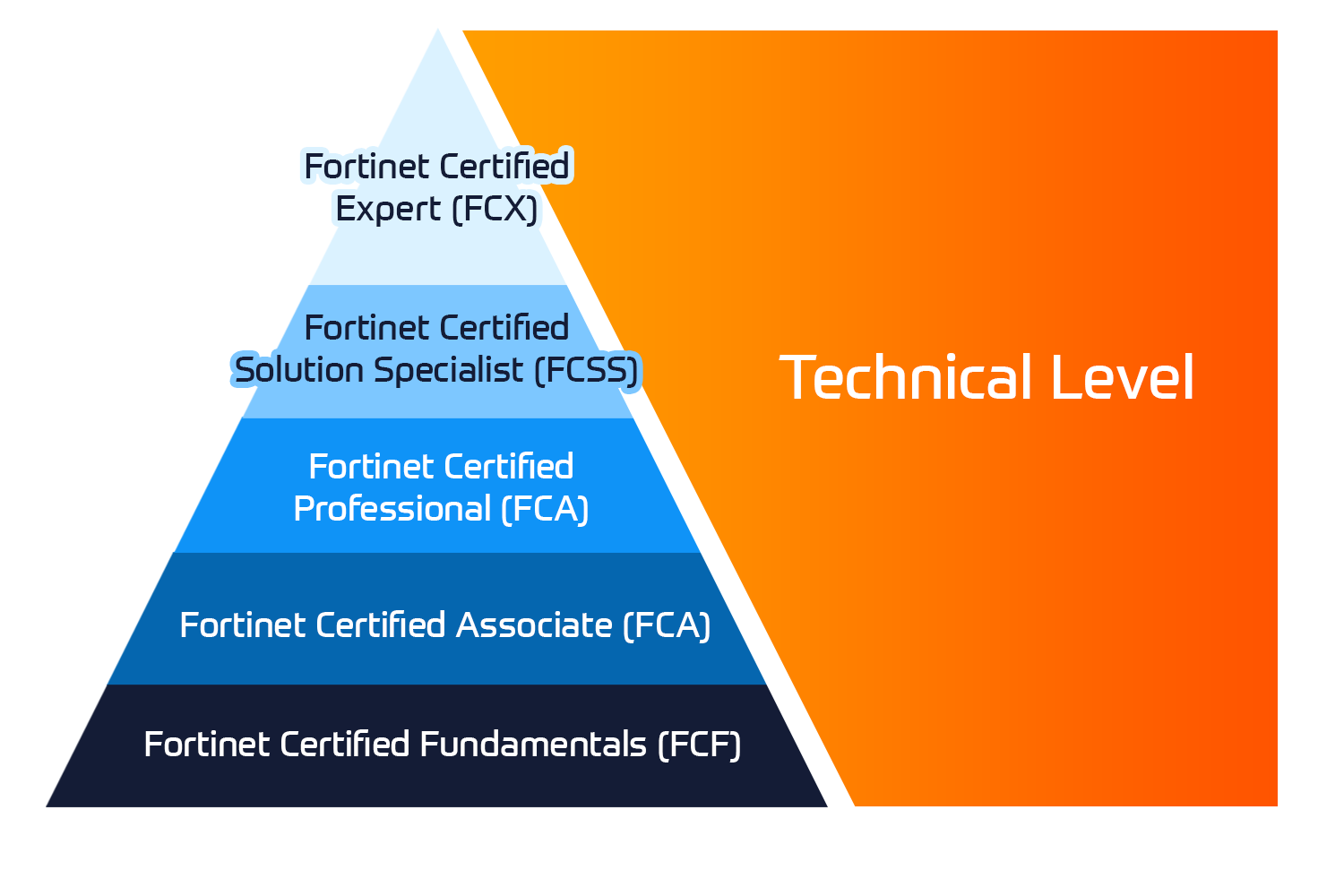
Insoft Services on auktorisoitu Fortinet-kouluttaja useassa Euroopan maassa.

Katso lisää Fortinet Premier Authorized Training Center
Fortinet Training Courses

ATC Status

Tarkista ATC-tilamme valituissa Euroopan maissa.

Katso lisää Fortinet Premier Authorized Training Center
AWS

Kurssit

Koulutus sisältää omatoimisia laboratorioita käytännön AWS-harjoitteluun tosielämän skenaarioissa, jolloin voit oppia omaan tahtiisi, luokassa, töissä tai verkossa.

Katso lisää AWS
Extreme Networks Training Partner

Kurssit

Extreme Networks Technical Trainingin kehitys tarjoaa kattavan progressiivisen polun associate-akkreditoinnista ammatilliseen akkreditointiin.

Katso lisää Extreme Networks Training Partner
Extreme Networks Training Partner

ATP-akkreditointi

Valtuutettuna koulutuskumppanina (ATP) Insoft Services varmistaa, että saat korkeimman saatavilla olevan koulutuksen.

Katso lisää Extreme Networks Training Partner
Insoft Services

Tiimimme

Koulutusvalikoimaamme kuuluu laaja valikoima IT-koulutusta IP-palveluntarjoajilta, mukaan lukien Cisco, Extreme Networks, Fortinet, Microsoft, muutamia mainitakseni, EMEA-alueella.

Katso lisää Insoft Services

Microsoft Power Automate RPA Developer (PL-500T00-A)

Ota yhteyttä

Voit olla meihin yhteydessä ja tiedustella koulutuksistamme täydentämällä yhteystietosi ja koulutuksen nimen oheen.

Tietosuojalauseke ja yksityisyys

Suostun vastaanottamaan sähköpostiviestejä ja/tai puheluita Insoft Services Oy: n tuotteista ja palveluista.
Hyväksyn, että tietojani kerätään ja käsitellään Insoft Servicesin tietosuojakäytännössä kuvatulla tavalla.

Close

Microsoft Power Automate RPA Developer (PL-500T00-A)

VARAA NYT
Microsoft Power Automate RPA Developer (PL-500T00-A)
Kesto
5 päivää
Toimitus
(Online ja paikan päällä)
Hinta
Hinta pyydettäessä

Candidates for this course automate time-consuming and repetitive tasks by using Microsoft Power Automate. They review solution requirements, create process documentation, and design, develop, troubleshoot, and evaluate solutions. Candidates work with business stakeholders to improve and automate business workflows. They collaborate with administrators to deploy solutions to production environments, and they support solutions.

Associated Certification:

  • Microsoft Certified: Power Automate RPA Developer Associate
  • Take your first steps with Power Automate for desktop
  • Power Automate for desktop development essentials
  • Build your first Power Automate for desktop flow
  • Define input and output parameters in Power Automate
  • Integrate desktop flows with Outlook connector in Power Automate for desktop
  • Connect a cloud flow to desktop flows in Power Automate for desktop
  • Use AI Builder to process invoice forms in Power Automate
  • Use the Teams connector in Power Automate
  • Run a Power Automate for desktop flow in unattended mode
  • Optimize your business process with process advisor
  • Handle variables in Power Automate for desktop
  • Automate repetitive tasks using loops in Power Automate for desktop
  • Adjust process behavior using conditional actions with Power Automate for desktop
  • Configure flow control in Power Automate for desktop
  • Generate Power Automate for desktop flows by recording
  • Configure exception and error handling in Power Automate for desktop
  • Control file and folder handling in Power Automate for desktop
  • Web automation in Power Automate for desktop
  • Use Power Automate for desktop to interact with windows and applications
  • Excel automation in Power Automate for desktop
  • Automating email handling in Power Automate for desktop
  • Automate system, workstation, and services actions in Power Automate for desktop
  • Communicate using message boxes in Power Automate for desktop flows
  • Text manipulation in Power Automate for desktop
  • Simulate mouse and keyboard actions by using Power Automate for desktop
  • Combine Power Automate desktop and cloud flows
  • Database handling in Power Automate for desktop
  • Active Directory handling in Power Automate for desktop
  • Scripting in Power Automate for desktop
  • OCR technologies in Power Automate for desktop
  • Get started with custom connectors in Power Automate
  • Configure custom connectors with authenticated APIs in Power Automate
  • Introduction to Microsoft Power Platform security and governance

If you’re a developer with a keen interest in providing automated solutions for your organization, this certification could be a great fit for you. You automate time-consuming and repetitive tasks by using Microsoft Power Automate. You review solution requirements, create process documentation, and design, develop, deploy, integrate, troubleshoot, and evaluate solutions. Working with business stakeholders, you help to improve and automate business workflows.

Candidates for this course automate time-consuming and repetitive tasks by using Microsoft Power Automate. They review solution requirements, create process documentation, and design, develop, troubleshoot, and evaluate solutions. Candidates work with business stakeholders to improve and automate business workflows. They collaborate with administrators to deploy solutions to production environments, and they support solutions.

Associated Certification:

  • Microsoft Certified: Power Automate RPA Developer Associate
  • Take your first steps with Power Automate for desktop
  • Power Automate for desktop development essentials
  • Build your first Power Automate for desktop flow
  • Define input and output parameters in Power Automate
  • Integrate desktop flows with Outlook connector in Power Automate for desktop
  • Connect a cloud flow to desktop flows in Power Automate for desktop
  • Use AI Builder to process invoice forms in Power Automate
  • Use the Teams connector in Power Automate
  • Run a Power Automate for desktop flow in unattended mode
  • Optimize your business process with process advisor
  • Handle variables in Power Automate for desktop
  • Automate repetitive tasks using loops in Power Automate for desktop
  • Adjust process behavior using conditional actions with Power Automate for desktop
  • Configure flow control in Power Automate for desktop
  • Generate Power Automate for desktop flows by recording
  • Configure exception and error handling in Power Automate for desktop
  • Control file and folder handling in Power Automate for desktop
  • Web automation in Power Automate for desktop
  • Use Power Automate for desktop to interact with windows and applications
  • Excel automation in Power Automate for desktop
  • Automating email handling in Power Automate for desktop
  • Automate system, workstation, and services actions in Power Automate for desktop
  • Communicate using message boxes in Power Automate for desktop flows
  • Text manipulation in Power Automate for desktop
  • Simulate mouse and keyboard actions by using Power Automate for desktop
  • Combine Power Automate desktop and cloud flows
  • Database handling in Power Automate for desktop
  • Active Directory handling in Power Automate for desktop
  • Scripting in Power Automate for desktop
  • OCR technologies in Power Automate for desktop
  • Get started with custom connectors in Power Automate
  • Configure custom connectors with authenticated APIs in Power Automate
  • Introduction to Microsoft Power Platform security and governance

If you’re a developer with a keen interest in providing automated solutions for your organization, this certification could be a great fit for you. You automate time-consuming and repetitive tasks by using Microsoft Power Automate. You review solution requirements, create process documentation, and design, develop, deploy, integrate, troubleshoot, and evaluate solutions. Working with business stakeholders, you help to improve and automate business workflows.