Cisco Training Courses

Kurssit

Insoft on palvellut IT-yhteisöä Ciscon virallisella koulutustarjonnalla vuodesta 2010. Tältä sivulta löydät kaikki olennaiset tiedot Ciscon koulutuksesta.

Katso lisää Cisco Training Learning Partner
Cisco Learning Credits

Cisco Learning Credits

Cisco opintopisteet (CLC) ovat suoraan Ciscon kanssa lunastettuja prepaid-koulutusseteleitä, jotka helpottavat menestyksen suunnittelua ostaessasi Ciscon tuotteita ja palveluita.

Katso lisää Cisco Training Learning Partner
Cisco Continuing Education

Cisco Continuing Education

Cisco täydennyskoulutusohjelma tarjoaa kaikille aktiivisille sertifioinnin haltijoille joustavia vaihtoehtoja uudelleensertifiointiin suorittamalla erilaisia kelvollisia koulutuskohteita.

Katso lisää Cisco Training Learning Partner
Cisco U Digital Learning

Cisco Digital Learning

Sertifioidut työntekijät ovat ARVOSTETTUJA omaisuuseriä. Tutustu Ciscon valtuutettuun digitaaliseen oppimiskirjastoon ja kouluta itseäsi tallennettujen istuntojen avulla.

Katso lisää Cisco Training Learning Partner
Cisco Business Enablement

Cisco Business Enablement

Cisco Business Enablement Partner Program keskittyy Cisco Channel Partnersin ja asiakkaiden liiketoimintataitojen terävöittämiseen.

Katso lisää Cisco Training Learning Partner
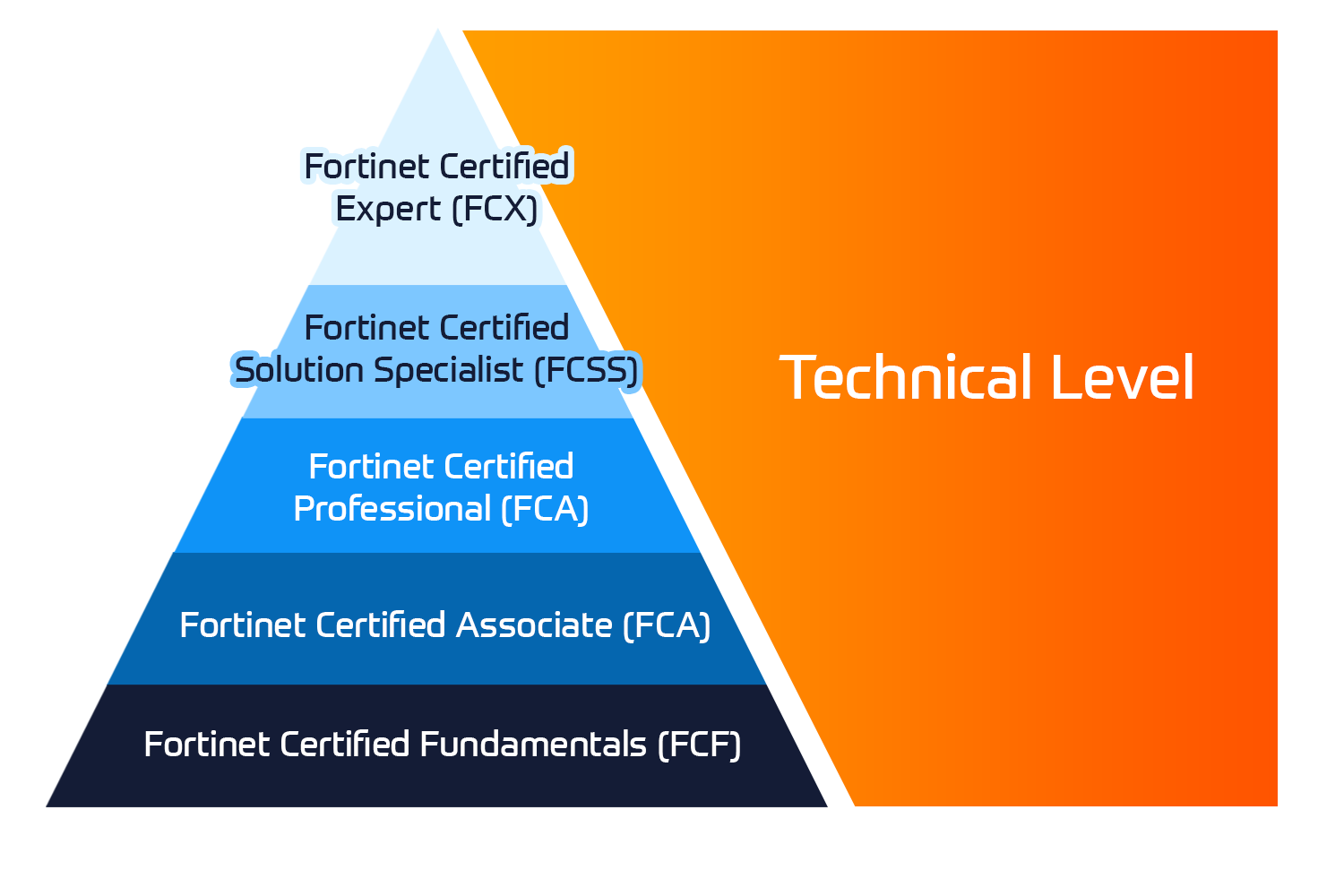
Fortinet Certification Training

Kurssit

Insoft Services on auktorisoitu Fortinet-kouluttaja useassa Euroopan maassa.

Katso lisää Fortinet Premier Authorized Training Center
Fortinet Training Courses

ATC Status

Tarkista ATC-tilamme valituissa Euroopan maissa.

Katso lisää Fortinet Premier Authorized Training Center
AWS

Kurssit

Koulutus sisältää omatoimisia laboratorioita käytännön AWS-harjoitteluun tosielämän skenaarioissa, jolloin voit oppia omaan tahtiisi, luokassa, töissä tai verkossa.

Katso lisää AWS
Extreme Networks Training Partner

Kurssit

Extreme Networks Technical Trainingin kehitys tarjoaa kattavan progressiivisen polun associate-akkreditoinnista ammatilliseen akkreditointiin.

Katso lisää Extreme Networks Training Partner
Extreme Networks Training Partner

ATP-akkreditointi

Valtuutettuna koulutuskumppanina (ATP) Insoft Services varmistaa, että saat korkeimman saatavilla olevan koulutuksen.

Katso lisää Extreme Networks Training Partner
Insoft Services

Tiimimme

Koulutusvalikoimaamme kuuluu laaja valikoima IT-koulutusta IP-palveluntarjoajilta, mukaan lukien Cisco, Extreme Networks, Fortinet, Microsoft, muutamia mainitakseni, EMEA-alueella.

Katso lisää Insoft Services

Data Wrangling with Python

Ota yhteyttä

Voit olla meihin yhteydessä ja tiedustella koulutuksistamme täydentämällä yhteystietosi ja koulutuksen nimen oheen.

Tietosuojalauseke ja yksityisyys

Suostun vastaanottamaan sähköpostiviestejä ja/tai puheluita Insoft Services Oy: n tuotteista ja palveluista.
Hyväksyn, että tietojani kerätään ja käsitellään Insoft Servicesin tietosuojakäytännössä kuvatulla tavalla.

Close

Data Wrangling with Python

VARAA NYT
Kesto
3 päivää
Toimitus
(Online ja paikan päällä)
Hinta
Hinta pyydettäessä

Data is the new oil, but it comes crude. To do anything meaningful – modelling, visualization, machine learning, for predictive analysis – you first need to wrestle and wrangle with data. This Data Wrangling with Python course teaches you the core ideas behind these processes and equips you with knowledge of the most popular tools and techniques in the domain.

The course starts with the absolute basics of Python, focusing mainly on data structures. It then delves into the fundamental tools of data wrangling like NumPy and Pandas libraries. You’ll explore useful insights into why you should stay away from traditional ways of data cleaning, as done in other languages, and take advantage of the specialized pre-built routines in Python. This combination of Python tips and tricks will also demonstrate how to use the same Python backend and extract/transform data from an array of sources including the Internet, large database vaults, and Excel financial tables. To help you prepare for more challenging scenarios, you’ll cover how to handle missing or wrong data, and reformat it based on the requirements from the downstream analytics tool. The course will further help you grasp concepts through real-world examples and datasets.

By the end of this course, you will be confident in using a diverse array of sources to extract, clean, transform, and format your data efficiently.

Lesson 1: Introduction to Data Structure using Python

  • Python for Data Wrangling
  • Lists, Sets, Strings, Tuples, and Dictionaries

Lesson 2: Advanced Operations on Built-In Data Structure

  • Advanced-Data Structures
  • Basic File Operations in Python

Lesson 3: Introduction to NumPy, Pandas, and Matplotlib

  • NumPy Arrays
  • Pandas DataFrames
  • Statistics and Visualization with NumPy and Pandas
  • Using NumPy and Pandas to Calculate Basic Descriptive Statistics on the DataFrame

Lesson 4: Deep Dive into Data Wrangling with Python

  • Subsetting, Filtering, and Grouping
  • Detecting Outliers and Handling Missing Values
  • Concatenating, Merging, and Joining
  • Useful Methods of Pandas

Lesson 5: Get Comfortable with a Different Kind of Data Sources

  • Reading Data from Different Text-Based (and Non-Text-Based) Sources
  • Introduction to BeautifulSoup4 and Web Page Parsing

Lesson 6: Learning the Hidden Secrets of Data Wrangling

  • Advanced List Comprehension and the zip Function
  • Data Formatting

Lesson 7: Advanced Web Scraping and Data Gathering

  • Basics of Web Scraping and BeautifulSoup libraries
  • Reading Data from XML

Lesson 8: RDBMS and SQL

  • Refresher of RDBMS and SQL
  • Using an RDBMS (MySQL/PostgreSQL/SQLite)

Lesson 9: Application in real life and Conclusion of course

  • Applying Your Knowledge to a Real-life Data Wrangling Task
  • An Extension to Data Wrangling

Data Wrangling with Python takes a practical approach to equip beginners with the most essential data analysis tools in the shortest possible time. It contains multiple activities that use real-life business scenarios for you to practice and apply your new skills in a highly relevant context.

Hardware:

For an optimal student experience, we recommend the following hardware configuration:

  • Processor: Intel Core i5 or equivalent
  • Memory: 8GB RAM or higher
  • Internet Connection

Software:

You’ll also need the following software installed in advance:

  • OS: Windows 7 SP1 64-bit, Windows 8.1 64-bit or Windows 10 64-bit, Ubuntu Linux, or the latest version of OS X
  • Browser: Google Chrome/Mozilla Firefox Latest Version
  • Notepad++/Sublime Text as IDE (Optional, as you can practice everything using Jupyter note course on your browser)
  • Python 3.4+ (latest is Python 3.7) installed (from https://python.org)
  • Python libraries as needed (Jupyter, NumPy, Pandas, Matplotlib, BeautifulSoup4, and so)

Data is the new oil, but it comes crude. To do anything meaningful – modelling, visualization, machine learning, for predictive analysis – you first need to wrestle and wrangle with data. This Data Wrangling with Python course teaches you the core ideas behind these processes and equips you with knowledge of the most popular tools and techniques in the domain.

The course starts with the absolute basics of Python, focusing mainly on data structures. It then delves into the fundamental tools of data wrangling like NumPy and Pandas libraries. You’ll explore useful insights into why you should stay away from traditional ways of data cleaning, as done in other languages, and take advantage of the specialized pre-built routines in Python. This combination of Python tips and tricks will also demonstrate how to use the same Python backend and extract/transform data from an array of sources including the Internet, large database vaults, and Excel financial tables. To help you prepare for more challenging scenarios, you’ll cover how to handle missing or wrong data, and reformat it based on the requirements from the downstream analytics tool. The course will further help you grasp concepts through real-world examples and datasets.

By the end of this course, you will be confident in using a diverse array of sources to extract, clean, transform, and format your data efficiently.

Lesson 1: Introduction to Data Structure using Python

  • Python for Data Wrangling
  • Lists, Sets, Strings, Tuples, and Dictionaries

Lesson 2: Advanced Operations on Built-In Data Structure

  • Advanced-Data Structures
  • Basic File Operations in Python

Lesson 3: Introduction to NumPy, Pandas, and Matplotlib

  • NumPy Arrays
  • Pandas DataFrames
  • Statistics and Visualization with NumPy and Pandas
  • Using NumPy and Pandas to Calculate Basic Descriptive Statistics on the DataFrame

Lesson 4: Deep Dive into Data Wrangling with Python

  • Subsetting, Filtering, and Grouping
  • Detecting Outliers and Handling Missing Values
  • Concatenating, Merging, and Joining
  • Useful Methods of Pandas

Lesson 5: Get Comfortable with a Different Kind of Data Sources

  • Reading Data from Different Text-Based (and Non-Text-Based) Sources
  • Introduction to BeautifulSoup4 and Web Page Parsing

Lesson 6: Learning the Hidden Secrets of Data Wrangling

  • Advanced List Comprehension and the zip Function
  • Data Formatting

Lesson 7: Advanced Web Scraping and Data Gathering

  • Basics of Web Scraping and BeautifulSoup libraries
  • Reading Data from XML

Lesson 8: RDBMS and SQL

  • Refresher of RDBMS and SQL
  • Using an RDBMS (MySQL/PostgreSQL/SQLite)

Lesson 9: Application in real life and Conclusion of course

  • Applying Your Knowledge to a Real-life Data Wrangling Task
  • An Extension to Data Wrangling

Data Wrangling with Python takes a practical approach to equip beginners with the most essential data analysis tools in the shortest possible time. It contains multiple activities that use real-life business scenarios for you to practice and apply your new skills in a highly relevant context.

Hardware:

For an optimal student experience, we recommend the following hardware configuration:

  • Processor: Intel Core i5 or equivalent
  • Memory: 8GB RAM or higher
  • Internet Connection

Software:

You’ll also need the following software installed in advance:

  • OS: Windows 7 SP1 64-bit, Windows 8.1 64-bit or Windows 10 64-bit, Ubuntu Linux, or the latest version of OS X
  • Browser: Google Chrome/Mozilla Firefox Latest Version
  • Notepad++/Sublime Text as IDE (Optional, as you can practice everything using Jupyter note course on your browser)
  • Python 3.4+ (latest is Python 3.7) installed (from https://python.org)
  • Python libraries as needed (Jupyter, NumPy, Pandas, Matplotlib, BeautifulSoup4, and so)