Kurssit

Insoft on palvellut IT-yhteisöä Ciscon virallisella koulutustarjonnalla vuodesta 2010. Tältä sivulta löydät kaikki olennaiset tiedot Ciscon koulutuksesta.

Katso lisää

Cisco Learning Credits

Cisco opintopisteet (CLC) ovat suoraan Ciscon kanssa lunastettuja prepaid-koulutusseteleitä, jotka helpottavat menestyksen suunnittelua ostaessasi Ciscon tuotteita ja palveluita.

Katso lisää

Cisco Continuing Education

Cisco täydennyskoulutusohjelma tarjoaa kaikille aktiivisille sertifioinnin haltijoille joustavia vaihtoehtoja uudelleensertifiointiin suorittamalla erilaisia kelvollisia koulutuskohteita.

Katso lisää

Cisco Digital Learning

Sertifioidut työntekijät ovat ARVOSTETTUJA omaisuuseriä. Tutustu Ciscon valtuutettuun digitaaliseen oppimiskirjastoon ja kouluta itseäsi tallennettujen istuntojen avulla.

Katso lisää

Cisco Business Enablement

Cisco Business Enablement Partner Program keskittyy Cisco Channel Partnersin ja asiakkaiden liiketoimintataitojen terävöittämiseen.

Katso lisää

Kurssit

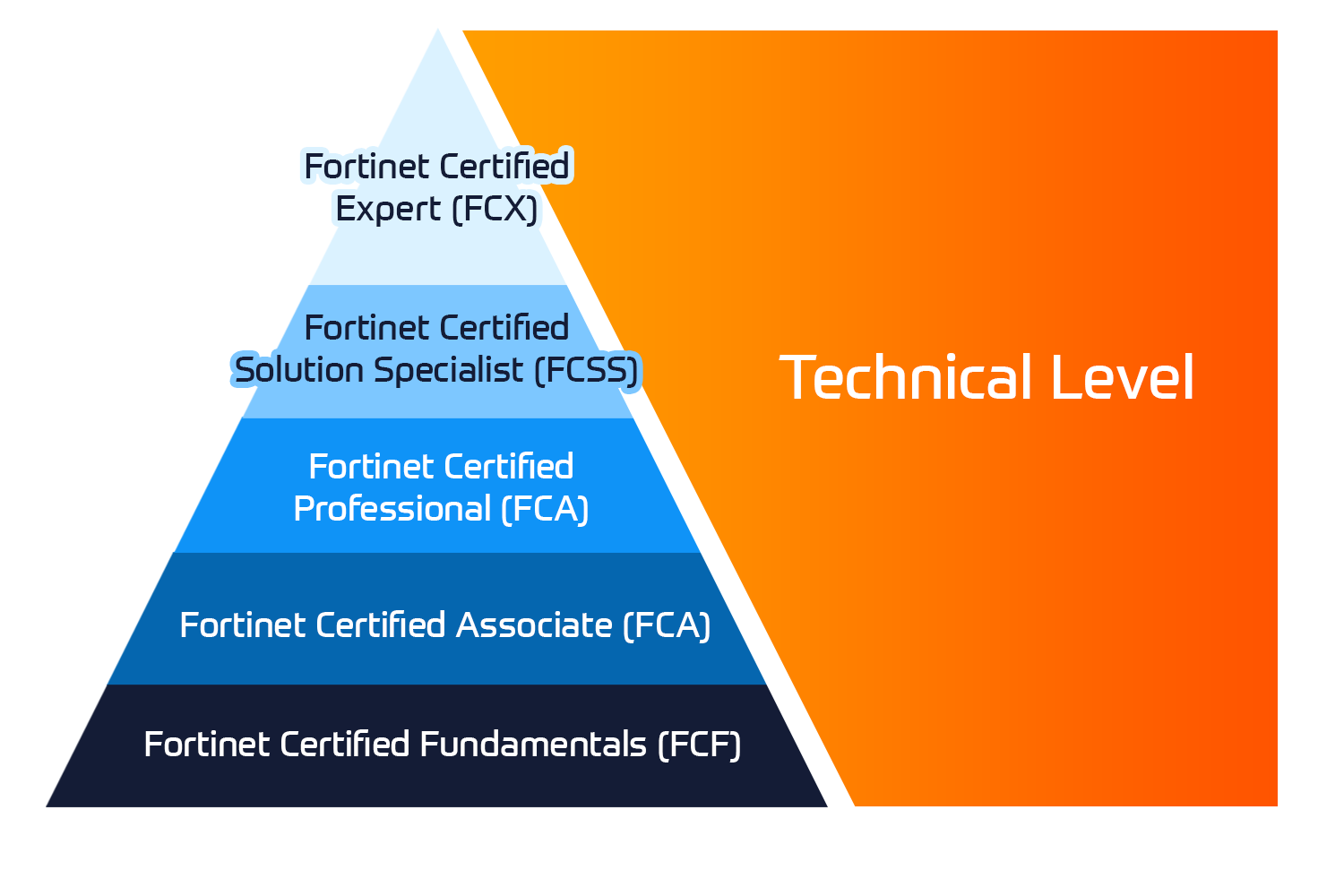
Insoft Services on auktorisoitu Fortinet-kouluttaja useassa Euroopan maassa.

Katso lisää

ATC Status

Tarkista ATC-tilamme valituissa Euroopan maissa.

Katso lisää

Kurssit

Koulutus sisältää omatoimisia laboratorioita käytännön AWS-harjoitteluun tosielämän skenaarioissa, jolloin voit oppia omaan tahtiisi, luokassa, töissä tai verkossa.

Katso lisää

Kurssit

Extreme Networks Technical Trainingin kehitys tarjoaa kattavan progressiivisen polun associate-akkreditoinnista ammatilliseen akkreditointiin.

Katso lisää

ATP-akkreditointi

Valtuutettuna koulutuskumppanina (ATP) Insoft Services varmistaa, että saat korkeimman saatavilla olevan koulutuksen.

Katso lisää


Maailmassa, jossa teknologiat kehittyvät nopeasti, jokainen yritys - yritys - tarvitsee kumppanin, johon luottaa ja luottaa verkkoinfrastruktuurinsa sujuvaan ja turvalliseen toimintaan.

Katso lisää


Missiomme: Tarjota asiantunteva joukko moderneja ja huippuluokan verkkoautomaatiotaitoja markkinoille asiantuntijapalvelujen avulla.

Katso lisää


Maailmassa, jossa teknologiat kehittyvät nopeasti, jokainen yritys - yritys - tarvitsee kumppanin, johon luottaa ja luottaa verkkoinfrastruktuurinsa sujuvaan ja turvalliseen toimintaan.

Katso lisää


Maailmassa, jossa teknologiat kehittyvät nopeasti, jokainen yritys - yritys - tarvitsee kumppanin, johon luottaa ja luottaa verkkoinfrastruktuurinsa sujuvaan ja turvalliseen toimintaan.

Katso lisää


Maailmassa, jossa teknologiat kehittyvät nopeasti, jokainen yritys - yritys - tarvitsee kumppanin, johon luottaa ja luottaa verkkoinfrastruktuurinsa sujuvaan ja turvalliseen toimintaan.

Katso lisää


Maailmassa, jossa teknologiat kehittyvät nopeasti, jokainen yritys - yritys - tarvitsee kumppanin, johon luottaa ja luottaa verkkoinfrastruktuurinsa sujuvaan ja turvalliseen toimintaan.

Katso lisää


Autamme organisaatioita ottamaan käyttöön Software-Defined Networking (SDN) -ratkaisuja, kuten Cisco DNA:ta.Lisäksi tiimillämme on laaja kokemus Cisco DNA Centerin integroinnista kolmannen osapuolen järjestelmiin.

Katso lisää


Maailmassa, jossa teknologiat kehittyvät nopeasti, jokainen yritys - yritys - tarvitsee kumppanin, johon luottaa ja luottaa verkkoinfrastruktuurinsa sujuvaan ja turvalliseen toimintaan.

Katso lisää

Tiimimme

Koulutusvalikoimaamme kuuluu laaja valikoima IT-koulutusta IP-palveluntarjoajilta, mukaan lukien Cisco, Extreme Networks, Fortinet, Microsoft, muutamia mainitakseni, EMEA-alueella.

Katso lisää

CompTIA A+ Certification Training (APLUS)

Ota yhteyttä

Voit olla meihin yhteydessä ja tiedustella koulutuksistamme täydentämällä yhteystietosi ja koulutuksen nimen oheen.

Tietosuojalauseke ja yksityisyys

Suostun vastaanottamaan sähköpostiviestejä ja/tai puheluita Insoft Services Oy: n tuotteista ja palveluista.
Hyväksyn, että tietojani kerätään ja käsitellään Insoft Servicesin tietosuojakäytännössä kuvatulla tavalla.

Close

CompTIA A+ Certification Training (APLUS)

VARAA NYT
Kesto
5 päivää
Toimitus
(Online ja paikan päällä)
Hinta
Hinta pyydettäessä

Start your tech career with CompTIA A+, the industry standard certification for entry-level roles. Trusted by employers worldwide, A+ builds foundational skills in hardware, software, networking, troubleshooting, and security. The latest version, V15, is updated for today’s technology and prepares you for roles like IT support specialist and help desk technician through two exams—Core 1 and Core 2.

Associated Certification:

  • Exam Codes: 220-1101 & 220-1102
  • Install, configure, and maintain hardware components and devices effectively.
  • Diagnose and resolve issues with PCs, mobile devices, and software applications.
  • Understand networking basics and configure wired/wireless SOHO networks.
  • Apply basic cybersecurity methods to mitigate threats and secure systems.
  • Install and support multiple operating systems, including Windows, Linux, and macOS.
  • Explain virtualization and cloud computing concepts and their applications.
  • Follow best practices for safety, environmental impacts, and effective communication.
  • Provide customer support using appropriate troubleshooting and communication skills.
  • Gain a respected certification that validates your foundation in tech and prepares you for success in your career.

This course prepares students to complete the corresponding exam. The CompTIA A+ Core 1 (220-1101) and CompTIA A+ Core 2 (220-1102).

CompTIA A+ Core 1 (V15)


Mobile Devices 

  • Hardware setup: installing components like batteries, cameras, and Wi-Fi antennas.
  • Accessory options: configuring USB, Bluetooth, NFC, and docking stations.
  • Network setup: configuring Wi-Fi, Bluetooth, cellular data, and synchronization settings.
  • Troubleshooting: identifying and fixing hardware and connectivity issues.

Networking 

  • Protocols and ports: learning about networking protocols, ports, and wireless technologies.
  • SOHO networks: setting up small office/home office networks, including IP addressing and VPNs.
  • Networking tools: troubleshooting with crimpers, cable testers, and Wi-Fi analyzers.

Hardware 

  • Component installation: setting up RAM, CPUs, and storage devices.
  • Cables and connectors: working with HDMI, Ethernet, and USB cables.
  • Peripheral devices: installing and maintaining printers, scanners, and other peripherals.
  • Motherboards and power: configuring motherboards, power supplies, and cooling solutions.

Visualization and Cloud Computing 

  • Virtualization concepts: understanding virtual machines, hypervisors, and desktop virtualization.
  • Cloud models: learning about IaaS, SaaS, and PaaS.

Hardware and Network Troubleshooting 

  • Diagnosing issues: identifying and fixing hardware, network, and connectivity problems.
  • Troubleshooting tools: using multimeters, cable testers, and loopback plugs

CompTIA A+ Core 2 (V15)


Operating Systems 

  • OS installation: working with Windows, macOS, Linux, and mobile operating systems.
  • Windows tools: managing systems with Task Manager, Command Prompt, and Disk Management.
  • File systems: handling file systems, updates, and OS upgrades.

Security 

  • Security measures: using encryption, access controls, and wireless security protocols.
  • Malware prevention: detecting, removing, and preventing malware threats.

Software Troubleshooting 

  • OS issues: diagnosing and resolving problems with operating systems and applications.
  • Mobile troubleshooting: addressing connectivity, app, and performance issues.
  • Security concerns: fixing unauthorized access and malware issues.

Operational Procedures 

  • Documentation: using best practices for system changes and documentation.
  • Safety and communication: following safety protocols and communicating effectively.
  • Backup and recovery: setting up workstation backups and recovery processes.

This course is designed for individuals who have basic computer user skills and who are interested in obtaining a job as an entry-level IT technician. This course is also designed for students who are seeking the CompTIA A+ certification and who want to prepare for the CompTIA A+ Core 1 220-1101 Certification Exam and the CompTIA A+ Core 2 220-1102 Certification Exam.

Start your tech career with CompTIA A+, the industry standard certification for entry-level roles. Trusted by employers worldwide, A+ builds foundational skills in hardware, software, networking, troubleshooting, and security. The latest version, V15, is updated for today’s technology and prepares you for roles like IT support specialist and help desk technician through two exams—Core 1 and Core 2.

Associated Certification:

  • Exam Codes: 220-1101 & 220-1102
  • Install, configure, and maintain hardware components and devices effectively.
  • Diagnose and resolve issues with PCs, mobile devices, and software applications.
  • Understand networking basics and configure wired/wireless SOHO networks.
  • Apply basic cybersecurity methods to mitigate threats and secure systems.
  • Install and support multiple operating systems, including Windows, Linux, and macOS.
  • Explain virtualization and cloud computing concepts and their applications.
  • Follow best practices for safety, environmental impacts, and effective communication.
  • Provide customer support using appropriate troubleshooting and communication skills.
  • Gain a respected certification that validates your foundation in tech and prepares you for success in your career.

This course prepares students to complete the corresponding exam. The CompTIA A+ Core 1 (220-1101) and CompTIA A+ Core 2 (220-1102).

CompTIA A+ Core 1 (V15)


Mobile Devices 

  • Hardware setup: installing components like batteries, cameras, and Wi-Fi antennas.
  • Accessory options: configuring USB, Bluetooth, NFC, and docking stations.
  • Network setup: configuring Wi-Fi, Bluetooth, cellular data, and synchronization settings.
  • Troubleshooting: identifying and fixing hardware and connectivity issues.

Networking 

  • Protocols and ports: learning about networking protocols, ports, and wireless technologies.
  • SOHO networks: setting up small office/home office networks, including IP addressing and VPNs.
  • Networking tools: troubleshooting with crimpers, cable testers, and Wi-Fi analyzers.

Hardware 

  • Component installation: setting up RAM, CPUs, and storage devices.
  • Cables and connectors: working with HDMI, Ethernet, and USB cables.
  • Peripheral devices: installing and maintaining printers, scanners, and other peripherals.
  • Motherboards and power: configuring motherboards, power supplies, and cooling solutions.

Visualization and Cloud Computing 

  • Virtualization concepts: understanding virtual machines, hypervisors, and desktop virtualization.
  • Cloud models: learning about IaaS, SaaS, and PaaS.

Hardware and Network Troubleshooting 

  • Diagnosing issues: identifying and fixing hardware, network, and connectivity problems.
  • Troubleshooting tools: using multimeters, cable testers, and loopback plugs

CompTIA A+ Core 2 (V15)


Operating Systems 

  • OS installation: working with Windows, macOS, Linux, and mobile operating systems.
  • Windows tools: managing systems with Task Manager, Command Prompt, and Disk Management.
  • File systems: handling file systems, updates, and OS upgrades.

Security 

  • Security measures: using encryption, access controls, and wireless security protocols.
  • Malware prevention: detecting, removing, and preventing malware threats.

Software Troubleshooting 

  • OS issues: diagnosing and resolving problems with operating systems and applications.
  • Mobile troubleshooting: addressing connectivity, app, and performance issues.
  • Security concerns: fixing unauthorized access and malware issues.

Operational Procedures 

  • Documentation: using best practices for system changes and documentation.
  • Safety and communication: following safety protocols and communicating effectively.
  • Backup and recovery: setting up workstation backups and recovery processes.

This course is designed for individuals who have basic computer user skills and who are interested in obtaining a job as an entry-level IT technician. This course is also designed for students who are seeking the CompTIA A+ certification and who want to prepare for the CompTIA A+ Core 1 220-1101 Certification Exam and the CompTIA A+ Core 2 220-1102 Certification Exam.