
Cisco Training Courses

Kurssit

Insoft on palvellut IT-yhteisöä Ciscon virallisella koulutustarjonnalla vuodesta 2010. Tältä sivulta löydät kaikki olennaiset tiedot Ciscon koulutuksesta.

Katso lisää Cisco Training Learning Partner
Cisco Learning Credits

Cisco Learning Credits

Cisco opintopisteet (CLC) ovat suoraan Ciscon kanssa lunastettuja prepaid-koulutusseteleitä, jotka helpottavat menestyksen suunnittelua ostaessasi Ciscon tuotteita ja palveluita.

Katso lisää Cisco Training Learning Partner
Cisco Continuing Education

Cisco Continuing Education

Cisco täydennyskoulutusohjelma tarjoaa kaikille aktiivisille sertifioinnin haltijoille joustavia vaihtoehtoja uudelleensertifiointiin suorittamalla erilaisia kelvollisia koulutuskohteita.

Katso lisää Cisco Training Learning Partner
Cisco U Digital Learning

Cisco Digital Learning

Sertifioidut työntekijät ovat ARVOSTETTUJA omaisuuseriä. Tutustu Ciscon valtuutettuun digitaaliseen oppimiskirjastoon ja kouluta itseäsi tallennettujen istuntojen avulla.

Katso lisää Cisco Training Learning Partner
Cisco Business Enablement

Cisco Business Enablement

Cisco Business Enablement Partner Program keskittyy Cisco Channel Partnersin ja asiakkaiden liiketoimintataitojen terävöittämiseen.

Katso lisää Cisco Training Learning Partner
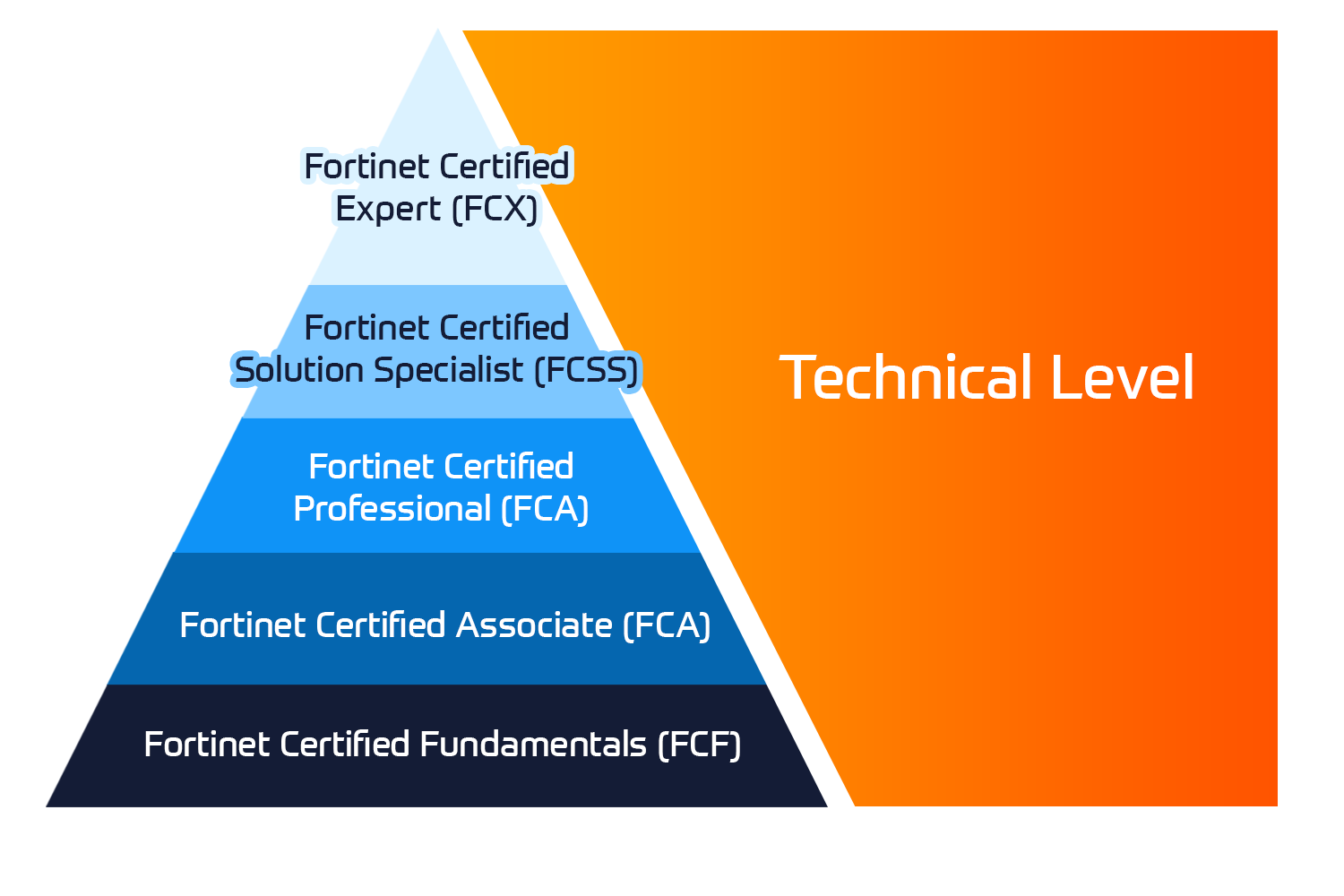
Fortinet Certification Training

Kurssit

Insoft Services on auktorisoitu Fortinet-kouluttaja useassa Euroopan maassa.

Katso lisää Fortinet Premier Authorized Training Center
Fortinet Training Courses

ATC Status

Tarkista ATC-tilamme valituissa Euroopan maissa.

Katso lisää Fortinet Premier Authorized Training Center
AWS

Kurssit

Koulutus sisältää omatoimisia laboratorioita käytännön AWS-harjoitteluun tosielämän skenaarioissa, jolloin voit oppia omaan tahtiisi, luokassa, töissä tai verkossa.

Katso lisää AWS
Extreme Networks Training Partner

Kurssit

Extreme Networks Technical Trainingin kehitys tarjoaa kattavan progressiivisen polun associate-akkreditoinnista ammatilliseen akkreditointiin.

Katso lisää Extreme Networks Training Partner
Extreme Networks Training Partner

ATP-akkreditointi

Valtuutettuna koulutuskumppanina (ATP) Insoft Services varmistaa, että saat korkeimman saatavilla olevan koulutuksen.

Katso lisää Extreme Networks Training Partner
Insoft Services

Tiimimme

Koulutusvalikoimaamme kuuluu laaja valikoima IT-koulutusta IP-palveluntarjoajilta, mukaan lukien Cisco, Extreme Networks, Fortinet, Microsoft, muutamia mainitakseni, EMEA-alueella.

Katso lisää Insoft Services

Advanced HPE Networking Junos OS troubleshooting

Ota yhteyttä

Voit olla meihin yhteydessä ja tiedustella koulutuksistamme täydentämällä yhteystietosi ja koulutuksen nimen oheen.

Tietosuojalauseke ja yksityisyys

Suostun vastaanottamaan sähköpostiviestejä ja/tai puheluita Insoft Services Oy: n tuotteista ja palveluista.
Hyväksyn, että tietojani kerätään ja käsitellään Insoft Servicesin tietosuojakäytännössä kuvatulla tavalla.

Close

Advanced HPE Networking Junos OS troubleshooting

Advanced HPE Networking Junos OS troubleshooting
Kesto
3 päivää
Toimitus
(Online ja paikan päällä)
Hinta
Hinta pyydettäessä

This three-day, advanced-level course provides network engineers with advanced skills to diagnose and resolve complex failures on devices running HPE Networking Junos OS. Using a consistent lab environment based on the XYZ Corporation network, students troubleshoot realistic fault scenarios across switching, routing, MPLS, security, and multicast domains. The course covers a broad range of technologies, including Ethernet switching, Ethernet VPN–Virtual Extensible LAN (EVPN-VXLAN) IP fabrics, OSPF, IS-IS, BGP, MPLS Layer 3 VPNs (L3VPNs), stateful firewall security, SRX chassis clusters, site-to-site and remote access IPsec VPNs, application security, multicast, and class of service (CoS). Each topic follows a structured troubleshooting methodology that students can apply to production networks.

Through instructor-led scenarios and hands-on labs, students develop systematic troubleshooting workflows and gain practical experience isolating and fixing root causes. This course is based on Junos OS Release 25.2R1.8.

  • Troubleshoot Ethernet switching.
  • Troubleshoot a data center IP fabric.
  • Troubleshoot OSPF routing.
  • Troubleshoot IS-IS routing.
  • Troubleshoot BGP routing.
  • Troubleshoot route oscillation and routing loops.
  • Troubleshoot MPLS networks.
  • Troubleshoot stateful firewall security.
  • Troubleshoot SRX chassis clusters.
  • Troubleshoot IPsec VPNs.
  • Troubleshoot remote access VPNs.
  • Troubleshoot AppSecure services.
  • Troubleshoot multicast networks.
  • Troubleshoot CoS.

DAY 1

Introduction to the course network

  • Explain the headquarters data center network
  • Discuss the service provider network
  • Describe the remote branch office network
  • Describe the capabilities of the Junos MCP server
  • Lab 01: Examining the lab network

Troubleshooting Ethernet switching

  • Diagnose and repair common Ethernet switching problems
  • Lab 02: Troubleshooting Ethernet switching

Troubleshooting a data center IP fabric

  • Troubleshoot the EVPN-VXLAN IP fabric in the headquarters data center
  • Lab 03: Troubleshooting the headquarters IP fabric

Troubleshooting OSPF

  • Troubleshoot OSPF adjacencies in a single-area network
  • Troubleshoot OSPF routing in a multi-area network
  • Lab 04: Troubleshooting OSPF

Troubleshooting IS-IS

  • Troubleshoot IS-IS adjacencies
  • Troubleshoot IS-IS routing in a multi-area network
  • Lab 05: Troubleshooting IS-IS

DAY 2

Troubleshooting BGP

  • Troubleshoot BGP adjacencies
  • Troubleshoot BGP routing
  • Lab 06: Troubleshooting BGP

Troubleshooting route oscillation and routing loops

  • Diagnose and repair route oscillations and routing loops
  • Lab 07: Troubleshooting route oscillations and routing loops

Troubleshooting MPLS

  • Diagnose and repair MPLS Layer 3 VPN services
  • Lab 08: Troubleshooting MPLS

Troubleshooting stateful firewall security

  • Diagnose and repair security problems on a stateful firewall
  • Lab 09: Troubleshooting stateful security

Troubleshooting chassis clusters

  • Diagnose and repair out-of-band cluster management
  • Diagnose and repair fabric link issues
  • Diagnose and repair data plane issues
  • Lab 10: Troubleshooting SRX chassis clusters

DAY 3

Troubleshooting IPsec VPNs

  • Diagnose and repair IPsec tunnel failures
  • Diagnose and repair IPsec tunnel connectivity
  • Lab 11: Troubleshooting IPsec VPNs

Troubleshooting remote access VPNs

  • Diagnose and repair remote access VPN issues
  • Lab 12: Troubleshooting remote access VPNs

Troubleshooting application security

  • Diagnose and repair problems implementing application security
  • Lab 13: Troubleshooting application security

Troubleshooting multicast

  • Diagnose and repair problems with multicast networks
  • Lab 14: Troubleshooting multicast

Troubleshooting class of service

  • Explain the CoS topology
  • Diagnose and repair CoS-based IPsec VPNs
  • Diagnose and repair CoS problems within the service provider network
  • Lab 15: Troubleshooting class of service
  • SELF-STUDY MODULES

Junos OS troubleshooting commands

  • Examine helpful Junos OS troubleshooting commands

The primary audience for this course includes:

  • Network engineers responsible for operating and maintaining HPE Networking Junos Operating System devices in enterprise or service provider environments.
  • Network engineers who diagnose and resolve complex failures across routing, switching, MPLS, and
    security domains.
  • Individuals preparing for the Juniper Networks Certified Internet Specialist (JNCIS) or higher
    certification tracks.

Completion of the Junos Intermediate Routing and Junos Troubleshooting courses, or equivalent experience:

  • Working knowledge of OSPF, IS-IS, and BGP configuration and operation on Junos OS
  • Working knowledge of Ethernet switching, VLANs, and aggregated Ethernet on HPE Networking EX switches
  • Familiarity with SRX firewalls, including security zones, security policies, and the Junos OS flow module
  • Understanding of MPLS and L3VPN concepts is recommended but not required