Kurssit

Insoft on palvellut IT-yhteisöä Ciscon virallisella koulutustarjonnalla vuodesta 2010. Tältä sivulta löydät kaikki olennaiset tiedot Ciscon koulutuksesta.

Katso lisää

Cisco Learning Credits

Cisco opintopisteet (CLC) ovat suoraan Ciscon kanssa lunastettuja prepaid-koulutusseteleitä, jotka helpottavat menestyksen suunnittelua ostaessasi Ciscon tuotteita ja palveluita.

Katso lisää

Cisco Continuing Education

Cisco täydennyskoulutusohjelma tarjoaa kaikille aktiivisille sertifioinnin haltijoille joustavia vaihtoehtoja uudelleensertifiointiin suorittamalla erilaisia kelvollisia koulutuskohteita.

Katso lisää

Cisco Digital Learning

Sertifioidut työntekijät ovat ARVOSTETTUJA omaisuuseriä. Tutustu Ciscon valtuutettuun digitaaliseen oppimiskirjastoon ja kouluta itseäsi tallennettujen istuntojen avulla.

Katso lisää

Cisco Business Enablement

Cisco Business Enablement Partner Program keskittyy Cisco Channel Partnersin ja asiakkaiden liiketoimintataitojen terävöittämiseen.

Katso lisää

Kurssit

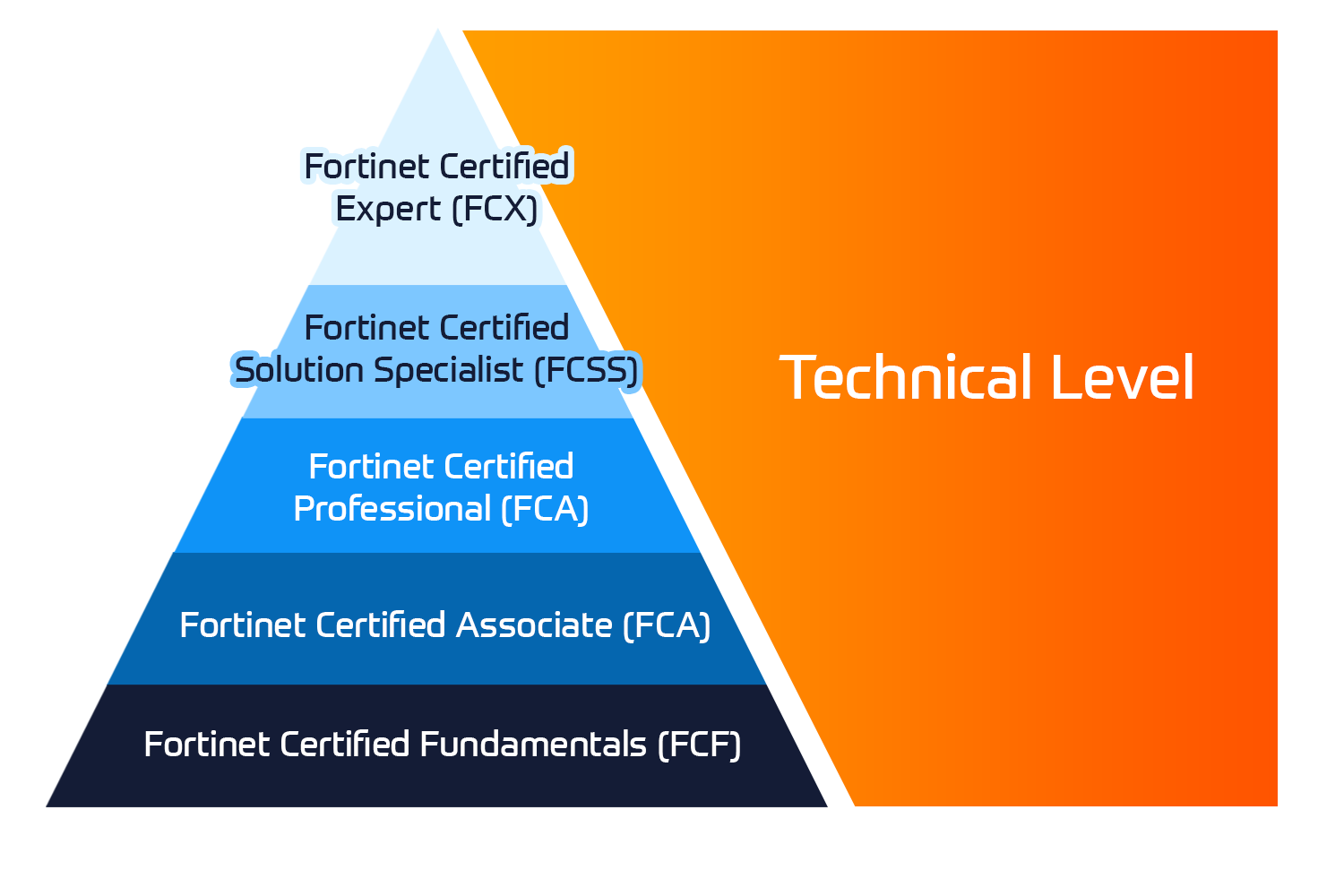
Insoft Services on auktorisoitu Fortinet-kouluttaja useassa Euroopan maassa.

Katso lisää

ATC Status

Tarkista ATC-tilamme valituissa Euroopan maissa.

Katso lisää

Kurssit

Koulutus sisältää omatoimisia laboratorioita käytännön AWS-harjoitteluun tosielämän skenaarioissa, jolloin voit oppia omaan tahtiisi, luokassa, töissä tai verkossa.

Katso lisää

Kurssit

Extreme Networks Technical Trainingin kehitys tarjoaa kattavan progressiivisen polun associate-akkreditoinnista ammatilliseen akkreditointiin.

Katso lisää

ATP-akkreditointi

Valtuutettuna koulutuskumppanina (ATP) Insoft Services varmistaa, että saat korkeimman saatavilla olevan koulutuksen.

Katso lisää


Maailmassa, jossa teknologiat kehittyvät nopeasti, jokainen yritys - yritys - tarvitsee kumppanin, johon luottaa ja luottaa verkkoinfrastruktuurinsa sujuvaan ja turvalliseen toimintaan.

Katso lisää


Missiomme: Tarjota asiantunteva joukko moderneja ja huippuluokan verkkoautomaatiotaitoja markkinoille asiantuntijapalvelujen avulla.

Katso lisää


Maailmassa, jossa teknologiat kehittyvät nopeasti, jokainen yritys - yritys - tarvitsee kumppanin, johon luottaa ja luottaa verkkoinfrastruktuurinsa sujuvaan ja turvalliseen toimintaan.

Katso lisää


Maailmassa, jossa teknologiat kehittyvät nopeasti, jokainen yritys - yritys - tarvitsee kumppanin, johon luottaa ja luottaa verkkoinfrastruktuurinsa sujuvaan ja turvalliseen toimintaan.

Katso lisää


Maailmassa, jossa teknologiat kehittyvät nopeasti, jokainen yritys - yritys - tarvitsee kumppanin, johon luottaa ja luottaa verkkoinfrastruktuurinsa sujuvaan ja turvalliseen toimintaan.

Katso lisää


Maailmassa, jossa teknologiat kehittyvät nopeasti, jokainen yritys - yritys - tarvitsee kumppanin, johon luottaa ja luottaa verkkoinfrastruktuurinsa sujuvaan ja turvalliseen toimintaan.

Katso lisää


Autamme organisaatioita ottamaan käyttöön Software-Defined Networking (SDN) -ratkaisuja, kuten Cisco DNA:ta.Lisäksi tiimillämme on laaja kokemus Cisco DNA Centerin integroinnista kolmannen osapuolen järjestelmiin.

Katso lisää


Maailmassa, jossa teknologiat kehittyvät nopeasti, jokainen yritys - yritys - tarvitsee kumppanin, johon luottaa ja luottaa verkkoinfrastruktuurinsa sujuvaan ja turvalliseen toimintaan.

Katso lisää

Tiimimme

Koulutusvalikoimaamme kuuluu laaja valikoima IT-koulutusta IP-palveluntarjoajilta, mukaan lukien Cisco, Extreme Networks, Fortinet, Microsoft, muutamia mainitakseni, EMEA-alueella.

Katso lisää

Forcepoint DLP Administrator

Ota yhteyttä

Voit olla meihin yhteydessä ja tiedustella koulutuksistamme täydentämällä yhteystietosi ja koulutuksen nimen oheen.

Tietosuojalauseke ja yksityisyys

Suostun vastaanottamaan sähköpostiviestejä ja/tai puheluita Insoft Services Oy: n tuotteista ja palveluista.
Hyväksyn, että tietojani kerätään ja käsitellään Insoft Servicesin tietosuojakäytännössä kuvatulla tavalla.

Close

Forcepoint DLP Administrator

VARAA NYT
Kesto
2 päivää
Toimitus
(Online ja paikan päällä)
Hinta
Hinta pyydettäessä

The 3-day Forcepoint Data Loss Prevention (DLP) Administrator course instructs you how to test an existing deployment, administer policies, handle incidents and endpoints, and manage the Forcepoint DLP system.

You will develop skills in creating data policies, building custom classifiers, and using predefined policies, as well as performing system maintenance.

  • Identify and define core DLP terminology, resources, and architecture.
  • Define and create each type of DLP classifier.
  • Define and create each type of DLP resource, including action plans and notifications.
  • Define and create each type of DLP policy, rule, and exception.
  • Manage policies and rules using bulk updates and policy levels.
  • Explain and test the capabilities and modes of OCR.
  • Build, deploy, and manage the Forcepoint One Endpoint.
  • Define and perform discovery activities.
  • Define and perform fingerprinting and machine learning activities.
  • Explain the functionality of file tagging and how DLP integrates with it.
  • Import and apply file tags, create classifiers, and use them in a policy and rule.
  • Review the operational status of DLP components and services.
  • Identify and analyze the primary logs used in DLP security manager.
  • Identify the elements included in a DLP backup and restore procedure and then perform this procedure.
  • Export policies and rules from DLP security manager.

Module 1: Getting Started with Forcepoint DLP

  • Describe Forcepoint DLP and how it works.
  • Apply a Forcepoint DLP license.
  • Locate DLP system components.
  • Find Forcepoint DLP product resources.

Module 2: Configuring Predefined Policies

  • Define Forcepoint DLP policies and rules.
  • Protect sensitive data using a predefined policy.
  • Block transfer of sensitive data.
  • Update multiple rules at the same time.
  • Configure notifications sent by a predefined policy.

Module 3: Configuring Quick Policies

  • Protect sensitive data using quick DLP policies.
  • Add user details to Forcepoint DLP.
  • Configure notifications with user details.

Module 4: Configuring Custom Policies

  • Edit a script classifier to protect data.
  • Protect data using a custom policy and a script classifier.
  • Decide to which users the policy applies.
  • Add users to a policy who are not part of your organization.
  • Add cumulative rules to a policy.

Module 5: Adding Custom Classifiers

  • Add a keyword classifier to use in a custom policy.
  • Add a dictionary classifier to a custom policy.
  • Configure different actions for different types of data transfer.
  • Decide which types of data transfer the policy monitors.
  • Add specific devices that are not monitored by a policy.

Module 6: Adding Further Policy Configuration

  • Add a regular expression to a custom policy.
  • Configure the order in which policies are applied.
  • Remove a group of users from being monitored by a policy.

Module 7: Creating Complex Classifiers

  • Create a conditional policy classifier.

Module 8: Configuring Optical Character Recognition (OCR)

  • Configure DLP to monitor text in image files.

Module 9: Installing Forcepoint One Endpoint (F1E)

  • Install F1E on an endpoint.
  • Configure a temporary bypass on an endpoint.
  • Give users the opportunity to explain when their actions trigger a policy.
  • Configure the operations of an application that Forcepoint DLP monitors.
  • Add applications that are not monitored by a policy.

Module 10: Configuring Discovery

  • Monitor data that have been saved on the network and endpoints.

Module 11: Configuring Fingerprinting and Machine Learning

  • Protect the data in files of a specific type using file fingerprinting.
  • Protect data in databases using fingerprinting.
  • Protect text documents using machine learning.

Module 12: Configuring File Labeling

  • Add file labeling classifiers to use in a policy.

Module 13: Monitoring System Health

  • Monitor the components of the DLP system.
  • Take a backup of the policies, rules, and configuration of DLP.
  • Export DLP policies.
  • System administrators, data security administrators, IT staff
  • Sales engineers, consultants, implementation specialists
  • Forcepoint channel partners and IT staff
  • DLP incident and forensic analysts
  • General understanding of system administration and internet services
  • Basic knowledge of networking and computer security concepts

To attend this virtual online course, you must have a computer with:

  • A high-speed internet connection (minimum of 1 MB connection required)
  • An up-to-date web browser (Google Chrome recommended)
  • PDF viewer
  • Microsoft Teams
  • Speakers and microphone or headset (headset recommended)
  • A separate tablet or e-book reader is also recommended for the course and lab book delivery.

The 3-day Forcepoint Data Loss Prevention (DLP) Administrator course instructs you how to test an existing deployment, administer policies, handle incidents and endpoints, and manage the Forcepoint DLP system.

You will develop skills in creating data policies, building custom classifiers, and using predefined policies, as well as performing system maintenance.

  • Identify and define core DLP terminology, resources, and architecture.
  • Define and create each type of DLP classifier.
  • Define and create each type of DLP resource, including action plans and notifications.
  • Define and create each type of DLP policy, rule, and exception.
  • Manage policies and rules using bulk updates and policy levels.
  • Explain and test the capabilities and modes of OCR.
  • Build, deploy, and manage the Forcepoint One Endpoint.
  • Define and perform discovery activities.
  • Define and perform fingerprinting and machine learning activities.
  • Explain the functionality of file tagging and how DLP integrates with it.
  • Import and apply file tags, create classifiers, and use them in a policy and rule.
  • Review the operational status of DLP components and services.
  • Identify and analyze the primary logs used in DLP security manager.
  • Identify the elements included in a DLP backup and restore procedure and then perform this procedure.
  • Export policies and rules from DLP security manager.

Module 1: Getting Started with Forcepoint DLP

  • Describe Forcepoint DLP and how it works.
  • Apply a Forcepoint DLP license.
  • Locate DLP system components.
  • Find Forcepoint DLP product resources.

Module 2: Configuring Predefined Policies

  • Define Forcepoint DLP policies and rules.
  • Protect sensitive data using a predefined policy.
  • Block transfer of sensitive data.
  • Update multiple rules at the same time.
  • Configure notifications sent by a predefined policy.

Module 3: Configuring Quick Policies

  • Protect sensitive data using quick DLP policies.
  • Add user details to Forcepoint DLP.
  • Configure notifications with user details.

Module 4: Configuring Custom Policies

  • Edit a script classifier to protect data.
  • Protect data using a custom policy and a script classifier.
  • Decide to which users the policy applies.
  • Add users to a policy who are not part of your organization.
  • Add cumulative rules to a policy.

Module 5: Adding Custom Classifiers

  • Add a keyword classifier to use in a custom policy.
  • Add a dictionary classifier to a custom policy.
  • Configure different actions for different types of data transfer.
  • Decide which types of data transfer the policy monitors.
  • Add specific devices that are not monitored by a policy.

Module 6: Adding Further Policy Configuration

  • Add a regular expression to a custom policy.
  • Configure the order in which policies are applied.
  • Remove a group of users from being monitored by a policy.

Module 7: Creating Complex Classifiers

  • Create a conditional policy classifier.

Module 8: Configuring Optical Character Recognition (OCR)

  • Configure DLP to monitor text in image files.

Module 9: Installing Forcepoint One Endpoint (F1E)

  • Install F1E on an endpoint.
  • Configure a temporary bypass on an endpoint.
  • Give users the opportunity to explain when their actions trigger a policy.
  • Configure the operations of an application that Forcepoint DLP monitors.
  • Add applications that are not monitored by a policy.

Module 10: Configuring Discovery

  • Monitor data that have been saved on the network and endpoints.

Module 11: Configuring Fingerprinting and Machine Learning

  • Protect the data in files of a specific type using file fingerprinting.
  • Protect data in databases using fingerprinting.
  • Protect text documents using machine learning.

Module 12: Configuring File Labeling

  • Add file labeling classifiers to use in a policy.

Module 13: Monitoring System Health

  • Monitor the components of the DLP system.
  • Take a backup of the policies, rules, and configuration of DLP.
  • Export DLP policies.
  • System administrators, data security administrators, IT staff
  • Sales engineers, consultants, implementation specialists
  • Forcepoint channel partners and IT staff
  • DLP incident and forensic analysts
  • General understanding of system administration and internet services
  • Basic knowledge of networking and computer security concepts

To attend this virtual online course, you must have a computer with:

  • A high-speed internet connection (minimum of 1 MB connection required)
  • An up-to-date web browser (Google Chrome recommended)
  • PDF viewer
  • Microsoft Teams
  • Speakers and microphone or headset (headset recommended)
  • A separate tablet or e-book reader is also recommended for the course and lab book delivery.