Kurssit

Insoft on palvellut IT-yhteisöä Ciscon virallisella koulutustarjonnalla vuodesta 2010. Tältä sivulta löydät kaikki olennaiset tiedot Ciscon koulutuksesta.

Katso lisää

Cisco Learning Credits

Cisco opintopisteet (CLC) ovat suoraan Ciscon kanssa lunastettuja prepaid-koulutusseteleitä, jotka helpottavat menestyksen suunnittelua ostaessasi Ciscon tuotteita ja palveluita.

Katso lisää

Cisco Continuing Education

Cisco täydennyskoulutusohjelma tarjoaa kaikille aktiivisille sertifioinnin haltijoille joustavia vaihtoehtoja uudelleensertifiointiin suorittamalla erilaisia kelvollisia koulutuskohteita.

Katso lisää

Cisco Digital Learning

Sertifioidut työntekijät ovat ARVOSTETTUJA omaisuuseriä. Tutustu Ciscon valtuutettuun digitaaliseen oppimiskirjastoon ja kouluta itseäsi tallennettujen istuntojen avulla.

Katso lisää

Cisco Business Enablement

Cisco Business Enablement Partner Program keskittyy Cisco Channel Partnersin ja asiakkaiden liiketoimintataitojen terävöittämiseen.

Katso lisää

Kurssit

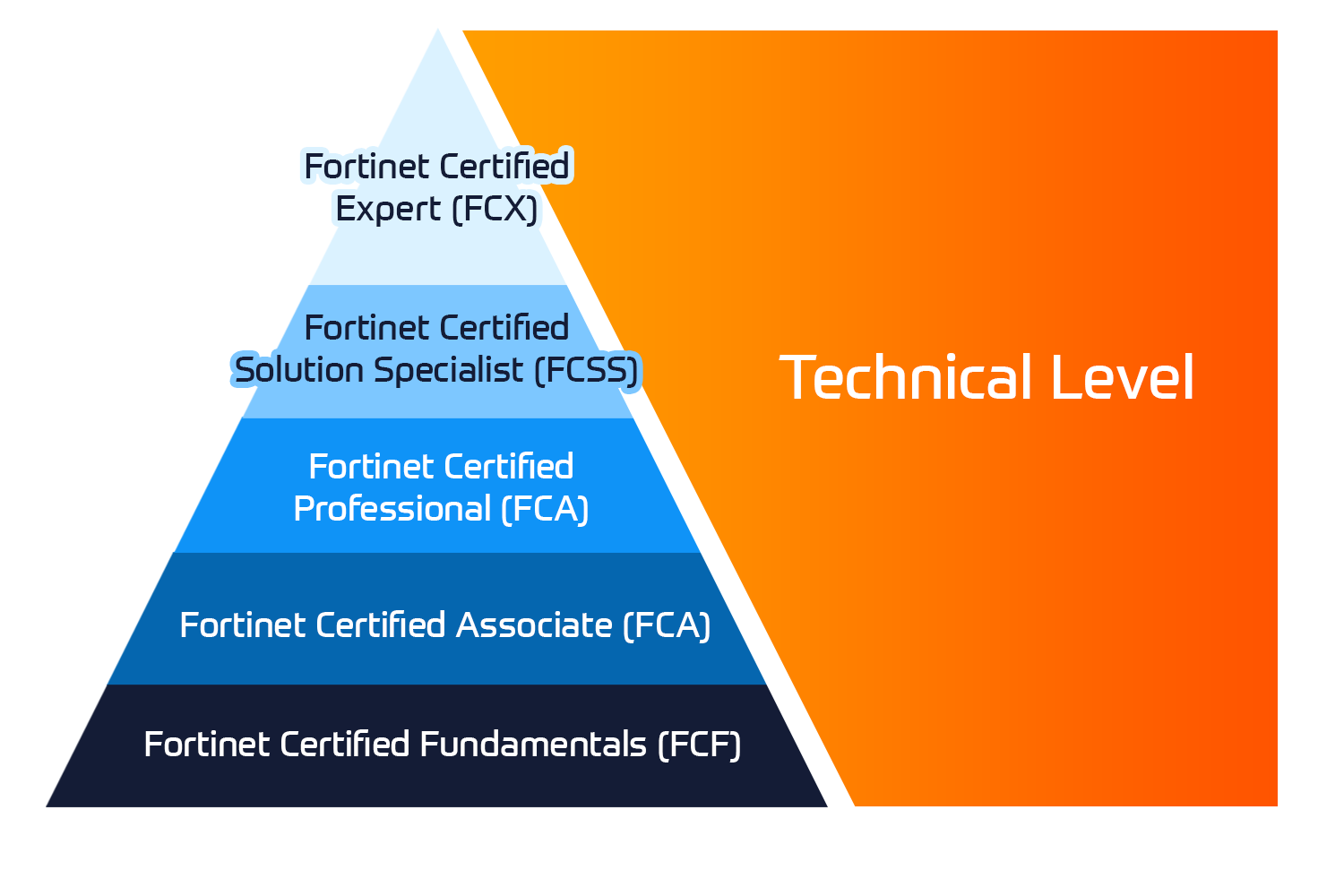
Insoft Services on auktorisoitu Fortinet-kouluttaja useassa Euroopan maassa.

Katso lisää

ATC Status

Tarkista ATC-tilamme valituissa Euroopan maissa.

Katso lisää

Kurssit

Koulutus sisältää omatoimisia laboratorioita käytännön AWS-harjoitteluun tosielämän skenaarioissa, jolloin voit oppia omaan tahtiisi, luokassa, töissä tai verkossa.

Katso lisää

Kurssit

Extreme Networks Technical Trainingin kehitys tarjoaa kattavan progressiivisen polun associate-akkreditoinnista ammatilliseen akkreditointiin.

Katso lisää

ATP-akkreditointi

Valtuutettuna koulutuskumppanina (ATP) Insoft Services varmistaa, että saat korkeimman saatavilla olevan koulutuksen.

Katso lisää


Maailmassa, jossa teknologiat kehittyvät nopeasti, jokainen yritys - yritys - tarvitsee kumppanin, johon luottaa ja luottaa verkkoinfrastruktuurinsa sujuvaan ja turvalliseen toimintaan.

Katso lisää


Missiomme: Tarjota asiantunteva joukko moderneja ja huippuluokan verkkoautomaatiotaitoja markkinoille asiantuntijapalvelujen avulla.

Katso lisää


Maailmassa, jossa teknologiat kehittyvät nopeasti, jokainen yritys - yritys - tarvitsee kumppanin, johon luottaa ja luottaa verkkoinfrastruktuurinsa sujuvaan ja turvalliseen toimintaan.

Katso lisää


Maailmassa, jossa teknologiat kehittyvät nopeasti, jokainen yritys - yritys - tarvitsee kumppanin, johon luottaa ja luottaa verkkoinfrastruktuurinsa sujuvaan ja turvalliseen toimintaan.

Katso lisää


Maailmassa, jossa teknologiat kehittyvät nopeasti, jokainen yritys - yritys - tarvitsee kumppanin, johon luottaa ja luottaa verkkoinfrastruktuurinsa sujuvaan ja turvalliseen toimintaan.

Katso lisää


Maailmassa, jossa teknologiat kehittyvät nopeasti, jokainen yritys - yritys - tarvitsee kumppanin, johon luottaa ja luottaa verkkoinfrastruktuurinsa sujuvaan ja turvalliseen toimintaan.

Katso lisää


Autamme organisaatioita ottamaan käyttöön Software-Defined Networking (SDN) -ratkaisuja, kuten Cisco DNA:ta.Lisäksi tiimillämme on laaja kokemus Cisco DNA Centerin integroinnista kolmannen osapuolen järjestelmiin.

Katso lisää


Maailmassa, jossa teknologiat kehittyvät nopeasti, jokainen yritys - yritys - tarvitsee kumppanin, johon luottaa ja luottaa verkkoinfrastruktuurinsa sujuvaan ja turvalliseen toimintaan.

Katso lisää

Tiimimme

Koulutusvalikoimaamme kuuluu laaja valikoima IT-koulutusta IP-palveluntarjoajilta, mukaan lukien Cisco, Extreme Networks, Fortinet, Microsoft, muutamia mainitakseni, EMEA-alueella.

Katso lisää

FortiSwitch Administrator

Ota yhteyttä

Voit olla meihin yhteydessä ja tiedustella koulutuksistamme täydentämällä yhteystietosi ja koulutuksen nimen oheen.

Tietosuojalauseke ja yksityisyys

Suostun vastaanottamaan sähköpostiviestejä ja/tai puheluita Insoft Services Oy: n tuotteista ja palveluista.
Hyväksyn, että tietojani kerätään ja käsitellään Insoft Servicesin tietosuojakäytännössä kuvatulla tavalla.

Close

FortiSwitch Administrator

VARAA NYT
FortiSwitch Administrator
Kesto
3 päivää (8 tuntia/päivä)
5 päivää (Puolen päivän istunnot)
Toimitus
(Online ja paikan päällä)
Hinta
Hinta pyydettäessä

In this course, you will learn how to deploy, provision, and manage a FortiSwitch with FortiGate using FortiLink. This course also covers the deployment and troubleshooting of layer 2 and layer 3 features, as well as the most common FortiSwitch stack topologies, including those that leverage multichassis link aggregation groups (MCLAG) for redundancy and higher performance. You will also learn about FortiSwitch in standalone mode, its unique features, and how to manage a standalone switch directly or from FortiEdge Cloud.

Product Versions:

  • FortiGate 7.6
  • FortiSwitch 7.6
  • FortiAnalyzer 7.6
  • FortiAuthenticator 6.6

Exam:

Associated Certifications:

  • This course is intended to help you prepare for the Fortinet NSE 5 – FortiSwitch Administrator exam. This exam is part of the FCP Secure Networking certification track.

Please note:

  • This course is delivered by the Fortinet team.

  • Explore the FortiSwitch portfolio and identify the supported management modes
  • Describe and deploy FortiSwitch in managed switch mode (FortiLink mode)
  • Understand Ethernet switching, VLANs, link aggregation groups (LAG), multichassis link aggregation groups (MCLAG), and layer 2 discovery
  • Identify the most common FortiSwitch topologies when deploying FortiSwitch in managed switch mode
  • Understand Spanning Tree Protocol (STP), Rapid Spanning Tree Protocol (RSTP), and Multiple Spanning Tree Protocol (MSTP) operation and configuration, as well as other loop protection features
  • Describe and configure layer 2 security to filter unwanted traffic and perform antispoofing
  • Configure layer 2 authentication using 802.1.X, and leverage 802.1X to assign dynamic VLANs to endpoints
  • Implement advanced features to increase port density, control network access, forward multicast traffic more effectively, and quarantine compromised devices
  • Simplify endpoint deployment by using Link Layer Discovery Protocol-Media Endpoint Discovery (LLDP-MED)
  • Share FortiSwitch ports across different VDOMs using multi-tenancy
  • Monitor FortiSwitch using SNMP, sFlow, and flow sampling
  • Describe the most useful troubleshooting tools available on FortiSwitch
  1. Switch Fundamentals
  2. Managed Switch
  3. Basic Administration
  4. STP
  5. Layer 2 Design
  6. Layer 2 Security
  7. Advanced Features
  8. QoS and Multi-Tenancy
  9. Monitoring
  10. Standalone Switch and FortiEdge Cloud
  11. Standalone Switch—Layer 2 and Layer 3
  12. Troubleshooting
  • Networking and security professionals involved in the management, configuration, administration, and monitoring of FortiSwitch devices used to provide secure network access to endpoints should attend this course.
  • Basic knowledge of networking
  • An understanding of layer 2 switching
  • An understanding of the topics covered in the following course:
    • FortiGate 7.6 Administrator

In this course, you will learn how to deploy, provision, and manage a FortiSwitch with FortiGate using FortiLink. This course also covers the deployment and troubleshooting of layer 2 and layer 3 features, as well as the most common FortiSwitch stack topologies, including those that leverage multichassis link aggregation groups (MCLAG) for redundancy and higher performance. You will also learn about FortiSwitch in standalone mode, its unique features, and how to manage a standalone switch directly or from FortiEdge Cloud.

Product Versions:

  • FortiGate 7.6
  • FortiSwitch 7.6
  • FortiAnalyzer 7.6
  • FortiAuthenticator 6.6

Exam:

Associated Certifications:

  • This course is intended to help you prepare for the Fortinet NSE 5 – FortiSwitch Administrator exam. This exam is part of the FCP Secure Networking certification track.

Please note:

  • This course is delivered by the Fortinet team.

  • Explore the FortiSwitch portfolio and identify the supported management modes
  • Describe and deploy FortiSwitch in managed switch mode (FortiLink mode)
  • Understand Ethernet switching, VLANs, link aggregation groups (LAG), multichassis link aggregation groups (MCLAG), and layer 2 discovery
  • Identify the most common FortiSwitch topologies when deploying FortiSwitch in managed switch mode
  • Understand Spanning Tree Protocol (STP), Rapid Spanning Tree Protocol (RSTP), and Multiple Spanning Tree Protocol (MSTP) operation and configuration, as well as other loop protection features
  • Describe and configure layer 2 security to filter unwanted traffic and perform antispoofing
  • Configure layer 2 authentication using 802.1.X, and leverage 802.1X to assign dynamic VLANs to endpoints
  • Implement advanced features to increase port density, control network access, forward multicast traffic more effectively, and quarantine compromised devices
  • Simplify endpoint deployment by using Link Layer Discovery Protocol-Media Endpoint Discovery (LLDP-MED)
  • Share FortiSwitch ports across different VDOMs using multi-tenancy
  • Monitor FortiSwitch using SNMP, sFlow, and flow sampling
  • Describe the most useful troubleshooting tools available on FortiSwitch
  1. Switch Fundamentals
  2. Managed Switch
  3. Basic Administration
  4. STP
  5. Layer 2 Design
  6. Layer 2 Security
  7. Advanced Features
  8. QoS and Multi-Tenancy
  9. Monitoring
  10. Standalone Switch and FortiEdge Cloud
  11. Standalone Switch—Layer 2 and Layer 3
  12. Troubleshooting
  • Networking and security professionals involved in the management, configuration, administration, and monitoring of FortiSwitch devices used to provide secure network access to endpoints should attend this course.
  • Basic knowledge of networking
  • An understanding of layer 2 switching
  • An understanding of the topics covered in the following course:
    • FortiGate 7.6 Administrator
    Kurssiaikataulu
  • ` Feb 10 - Feb 12, 2026
  • ` Feb 24 - Feb 26, 2026
  • ` Mar 10 - Mar 12, 2026
  • ` Mar 24 - Mar 26, 2026
  • ` Apr 7 - Apr 9, 2026
  • ` Apr 21 - Apr 23, 2026